
Payment Methods
Fast deposits, quick withdrawals, and secure checkout options.











BPExch Wallet App Download & Installation
Getting started with our wallet app is straightforward. Download and install the BPExch wallet on your device to manage deposits, withdrawals, and track your funds on the go.
Android APK Installation
- Visit our official website and navigate to the downloads section
- Download the BPExch wallet APK file (approximately 60 MB)
- Enable ‘Unknown Sources’ in your Android settings, then open and install the APK
iOS Access
iOS users can access the bpexch wallet app through our mobile-optimised website via Safari. Your connection is protected with 256-bit SSL encryption for secure transactions.
BPExch Wallet Login & Account Recovery
Access your bpexch wallet securely using your registered mobile number and password. Our streamlined login process includes OTP-based recovery and instant WhatsApp support for account access issues.
How to Log In
- Visit the bpexch wallet login page and enter your registered mobile number
- Input your password and tap “Login” to access your account
Password Reset & OTP Recovery
- Tap “Forgot Password” on the login screen
- Enter your registered mobile number to receive an OTP
- Verify the OTP and set your new password
If OTP delivery fails, contact our WhatsApp Agent Support with your CNIC for verified recovery assistance.
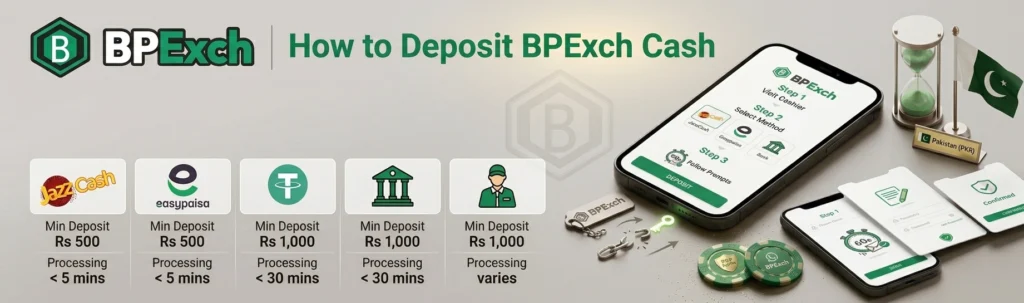
How to Deposit Funds Into Your BPExch Wallet
After your bpexch wallet download and login, navigate to the Cashier page to add funds. We support four convenient deposit methods tailored for Pakistani players, all with zero platform fees.
Supported Deposit Methods & Limits
Choose your preferred payment method below:
Method | Min Deposit | Processing Time |
|---|---|---|
JazzCash | Rs 500 | Instant |
Easypaisa | Rs 500 | Instant |
IBFT/RAAST | Rs 1,000 | Up to 30 min |
USDT Crypto | Rs 1,000 equiv | Up to 15 min |
Limits may vary—check the Cashier page for latest figures.
Deposit Processing Notes
- We charge zero platform fees on all deposits.
- Use your CNIC-linked account name to ensure smooth crediting into your bpexch wallet.
BPExch Wallet Withdrawal – Steps & Timelines
Withdrawing your winnings from your BPExch wallet is straightforward. We process requests within six hours and support multiple withdrawal channels, including our P2P agent network for added convenience.
How to Request a Withdrawal
- Navigate to the Cashier section and select “Withdraw”
- Enter your desired amount in PKR and choose your withdrawal method
- Confirm your bpexch wallet withdrawal request and await processing
Processing Time & Verification
We typically process bpexch live withdrawal requests within 6 hours. First-time withdrawals require CNIC verification for security purposes. You can receive funds via bank transfer, mobile wallets, or through our P2P agent network. Minimum withdrawal is PKR 500.
Payment Methods Comparison
Our bpexch wallet supports multiple payment options for your convenience. Compare deposit and withdrawal limits, processing speeds, and fees below to choose the method that works best for you.
Deposit & Withdrawal Methods at a Glance
Choose from four secure payment methods in your bpexch wallet:
Method | Min Deposit | Min Withdrawal | Processing Time | Platform Fee |
|---|---|---|---|---|
JazzCash | Rs 500 | Rs 1,000 | Instant / Up to 6 hrs | Zero |
Easypaisa | Rs 500 | Rs 1,000 | Instant / Up to 6 hrs | Zero |
Bank Transfer | Rs 1,000 | Rs 2,000 | 1–6 hrs / 1–6 hrs | Zero |
USDT (Crypto) | Rs 1,000 | Rs 2,000 | Instant / Up to 6 hrs | Zero |
Limits may vary — check Cashier for current figures.
BPExch Cash Balance & Transaction History
Your bpexch wallet dashboard gives you full visibility into your funds. Navigate to Menu → Wallet → Balance Overview to see real-money and bonus balances at a glance, track every transaction, and monitor live withdrawal status in real time.
Checking Your Current Cash Balance
Tap Menu → Wallet → Balance Overview. You’ll see Real Cash (withdrawable) and Bonus Balance (locked until you meet the Bonus Rollover Requirement). Example: PKR 5,000 real cash, PKR 2,000 bonus with 40% rollover remaining.
Viewing Your Transaction History
Access Transaction History to filter deposits, withdrawals, and bet settlements by date (DD/MM/YYYY). Export records or screenshot them. This log doubles as a spend-tracking tool under our Responsible Gambling Tools.
Tracking Live Withdrawal Status
Monitor pending withdrawals: Pending → Processing → Completed (or Failed). If status stalls, contact support via WhatsApp with your transaction ID.
Security & Verification for Your Wallet
Your bpexch wallet is protected with industry-standard encryption and verification protocols. We require CNIC verification before your first withdrawal, and we offer two-factor authentication to keep your account secure. All data is handled with complete discretion.
CNIC Verification: Steps & Timeline
- Open wallet settings and tap “Verification”
- Upload CNIC front and back (JPEG, PNG, or PDF)
- Ensure images are clear and not cropped
- Verification typically completes within 24 hours
Name on CNIC must match your registered account name. This KYC process is standard across all Pakistani gaming platforms.
Two-Factor Authentication Setup
Enable 2FA via OTP sent to your registered mobile. If OTP doesn’t arrive, wait 60 seconds and request again, or contact our WhatsApp support. All transmissions use 256-bit SSL encryption.
Tips to Keep Your Wallet Secure
- Use a unique, strong password
- Never share OTP codes with anyone
- Log out on shared devices
- Verify sender before clicking links
- Keep your registered mobile number active
- We never ask for passwords via message